What's Included in a Construction Camera System
A clear breakdown of the parts that make up a construction camera system: the on-site hardware, the cloud software, and the supporting services that keep it running.
If you are weighing up a construction camera for a job site, it helps to know what actually comes in the box, what runs in the background, and what support sits behind it. This guide breaks a construction camera system into its parts and explains why each one matters.
A complete system has two main pieces: the hardware on site and the software in the cloud. Around those sit a handful of supporting services. We will take them in turn.
Hardware
The hardware is everything physical on the site: the camera, the controller, the housing, the power, and the connectivity that ties them together.
The camera
A Buildcam camera captures high-resolution 24MP images. For context, 4K resolution is 8.3MP, so the images carry considerably more detail. That headroom matters on a construction site. It lets you zoom into a specific corner of the frame, weeks after the fact, without the image falling apart into blur or grain.
The controller
The controller is the brain of the unit. It communicates with the camera, tells it when to capture, manages its sleep and wake cycles, and handles uploading images to the cloud. The Buildcam controller runs autonomously from the moment it is powered on. There is no configuration to work through and nothing to tune before it starts capturing.
The housing
The housing is the shell that protects the camera and controller from the site around them. A good housing insulates the internals from heat, cold, and moisture, and keeps dust and water out. The Buildcam housing carries an IP66 rating, which means heavy rain and dusty conditions pose no threat to the equipment inside.
Connectivity
The camera stays connected through a cellular SIM, so it does not depend on wifi or a wired network being available on site. That independence is the point. Most sites have no reliable internet in the early phases, and the camera needs to work from day one regardless.
The cloud software
The software is the cloud platform the camera reports into. It receives the images, stores them, and gives your team a single place to work with them. Sentinel OS also connects to the tools construction teams already use for sharing project data.
Every image lands in an online gallery you can reach from a phone or a desktop. From there you can view the full archive, download individual images, forward them to specific people, and invite other team members onto the project. In short, it is a gallery built to sit alongside the way a project is actually managed.
Why the two halves matter together
The hardware and the software are the nuts and bolts of a construction camera system, and neither is much use without the other. You need a unit that self-monitors and captures reliably across the full length of a project, and you need a platform that makes those images easy to find, share, and act on.
The hardware also needs to be rugged by design. Whether the weather runs hot, cold, wet, or dry should not change what the camera delivers. An IP66 or higher rating is what makes that possible, so your team can focus on the build rather than the equipment.
Supporting services
The hardware and software make up the bulk of the offering. A few supporting services round it out.
Power
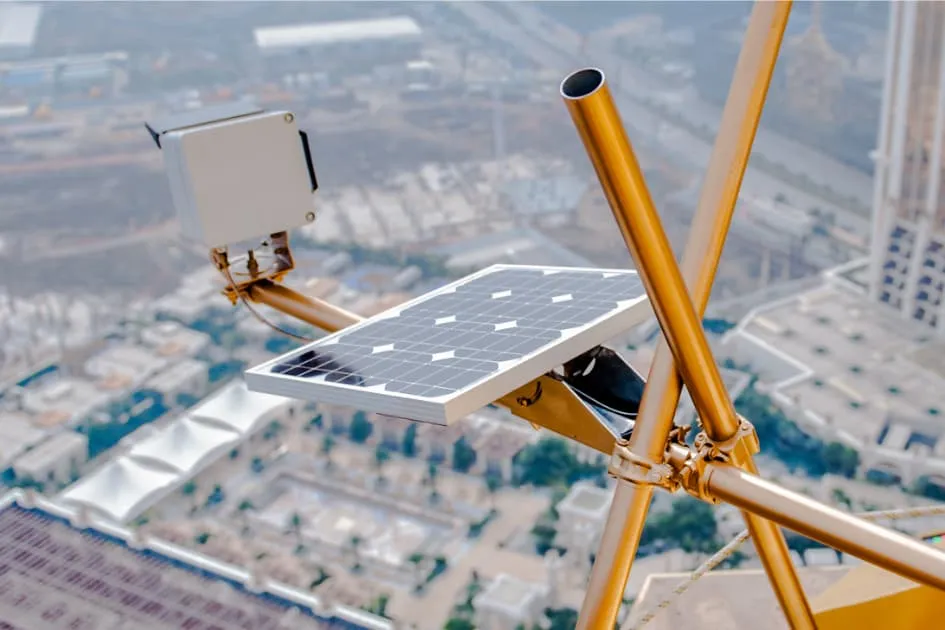
Buildcam cameras run on solar. A robust battery carries the unit through overcast stretches, and a run of cloudy days will not interrupt capture. If you have relied on mains power on past projects, solar is worth a serious look. It removes a dependency you do not control.
Customer service
The level of service you get varies from one supplier to the next. PhotoSentinel supports you from the point of purchase through to the delivery of your finished timelapse. Our team has years of experience in construction timelapse, so the advice you receive is grounded in the industry rather than a generic support script. If you are coming to timelapse for the first time, we are happy to walk you through it.
Timelapse video
Buildcam produces progress videos automatically, ready to download across short, medium, and longer windows so you always have a recent cut to hand. Sentinel OS also delivers 4K movies to your inbox on a regular schedule, which you can forward straight to stakeholders and key personnel. At the end of a project, a professionally finished 4K timelapse ties the whole build together.
Video is one of the more valuable parts of a camera system, because a record you cannot easily share does not do much work. An efficient way to create and distribute footage turns the archive into something people actually see.
Bringing it together
Here is the short version of what a construction camera system includes:
- Hardware: the physical components on site, from camera to housing to connectivity
- Cloud software: the gallery that stores your images and helps you manage them
- Power: a solar panel that gives you autonomy on the job site
- Customer service: a team with construction experience behind the product
- Timelapse video: automated progress cuts and a finished project film
If you want to look closer at the Buildcam construction camera system, the team is ready to talk it through.